1. 개요
진짜 빠른 세상이다. React Native 0.78버전이 나오고 2개월도 되지 않아 React Native 0.79버전이 배포되었다.
그래도 React Native 공식 계정을 팔로우하고 있어서 이런 내용을 놓치지 않는건 다행인 것 같다.
이번에도 전과 동일하게 React Native 0.79의 주요 변화점, 개선점을 살펴보았다.
React Native 0.79의 개발자 노트는 아래 링크에서 전문을 확인할 수 있다.
https://reactnative.dev/blog/2025/04/08/react-native-0.79
React Native 0.79 - Faster tooling and much more · React Native
Today we are excited to release React Native 0.79!
reactnative.dev
2. Metro 버전 업그레이드
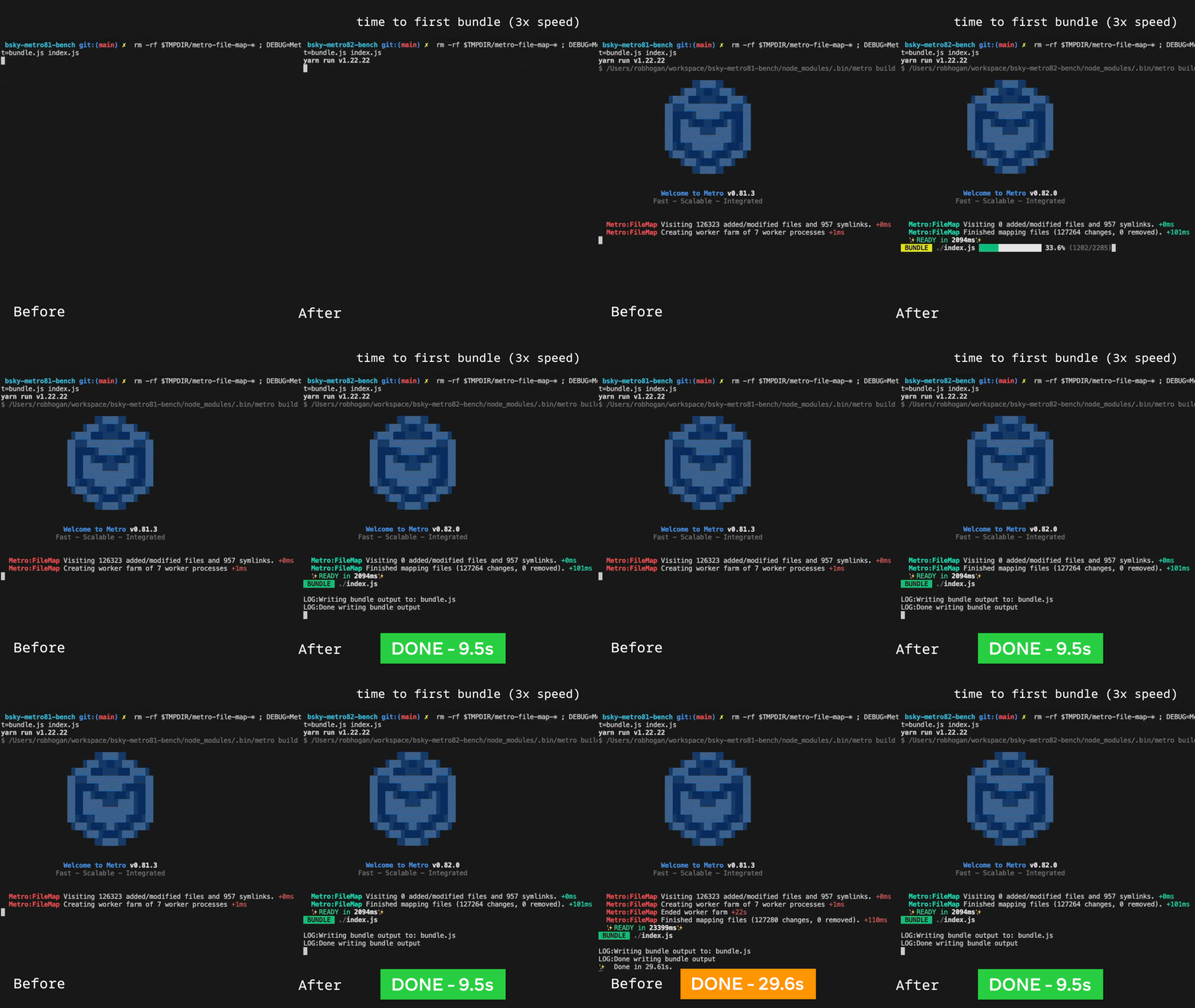
Metro 0.82가 탑재되었다. 이 버전은 deferred hashing을 사용하며 yarn start시 속도가 3배 이상 빨라졌다.
개인적으로 프로젝트 빌드하는 속도가 더 빨라졌으면 싶지만 이전버전에서 한번 개선이 있었기에 이번엔 Metro속도개선에 신경쓴게 아닌가 싶다.
3. JSC엔진 이전
JavaScriptCore (JSC)엔진을 React Native에서 커뮤니티 패키지인 @react-native-community/javascriptcore로 이전하는 작업이 진행중이다.
아무래도 커뮤니티 패키지에서 JSC를 관리하면 각종 업그레이드, 버전업에서 유리하기 때문에 이런 작업이 진행중이지 않나 싶다.
이 버전은 React Native의 배포와는 별개로 관리된다고 하니, 지속적으로 찾아보는게 좋을것 같다.
@react-native-community/javascriptcore의 Github주소는 아래와 같다.
https://github.com/react-native-community/javascriptcore#installation
GitHub - react-native-community/javascriptcore: JavaScriptCore for React Native
JavaScriptCore for React Native . Contribute to react-native-community/javascriptcore development by creating an account on GitHub.
github.com
4. iOS : Swift 호환 Native 모듈
Native 모듈을 React Native런타임에 넣을 수 있게 개편되었다. 이로 인해 package.json이 변경되었다.
Native모듈을 넣고 싶다면 아래처럼 package.json의 codegenConfig를 통해 모듈을 넣으면 된다.
이로인해 이전 React Native 0.77버전에서는 AppDelegate에 C++네이티브 모듈을 넣을 수 없었는데 이 문제가 해결되었고, AppDelegate가 Objective-C, Swift 둘 중 무엇으로 작성되었든 관계없이 사용할 수 있다.
  "codegenConfig": {
    "name": "<SpecName>",
    "type": "<types>",
    "jsSrcsDir": "<source_dir>",
    "android": {
      "javaPackageName": "<java.package.name>"
    },
    "ios": {
      "modulesConformingToProtocol": {
        "RCTImageURLLoader": [
          "<iOS-class-conforming-to-RCTImageURLLoader>",
          // example from react-native-camera-roll: https://github.com/react-native-cameraroll/react-native-cameraroll/blob/8a6d1b4279c76e5682a4b443e7a4e111e774ec0a/package.json#L118-L127
          // "RNCPHAssetLoader",
        ],
        "RCTURLRequestHandler": [
          "<iOS-class-conforming-to-RCTURLRequestHandler>",
          // example from react-native-camera-roll: https://github.com/react-native-cameraroll/react-native-cameraroll/blob/8a6d1b4279c76e5682a4b443e7a4e111e774ec0a/package.json#L118-L127
          // "RNCPHAssetUploader",
        ],
        "RCTImageDataDecoder": [
          "<iOS-class-conforming-to-RCTImageDataDecoder>",
          // we don't have a good example for this, but it works in the same way. Pass the name of the class that implements the RCTImageDataDecoder. It must be a Native Module.
        ]
      },
      "componentProvider": {
        "<componentName>": "<iOS-class-implementing-the-component>"
      },
      "modulesProvider": {
        "<moduleName>": "<iOS-class-implementing-the-RCTModuleProvider-protocol>"
      }
    }
  },
각 key별로 자세한 값, 방법은 Codegen 공식 문서에 나와있다.
https://reactnative.dev/docs/next/the-new-architecture/using-codegen#configuring-codegen
Using Codegen · React Native
This guide teaches how to:
reactnative.dev
5. Android : 시작 속도 향상
이번 버전부터는 APK파일의 Javascript bundle을 압축하지 않는다. 그렇기에 기존 Android 최초 실행시 Javascript bundle의 압축해제과정이 사라지고, Android앱이 더 빠르게 빌드될 수있다.
이러한 압축 과정이 사라지며 앱의 용랴잉 커질 수 있게 되었는데, app/build.gradle파일에서 enableBundleCompression속성을 이용해 동작을 설정할 수 있다.
react {
  // ...
  // If you want to compress the JS bundle (slower startup, less
  // space consumption)
  enableBundleCompression = true
  // If don't you want to compress the JS bundle (faster startup,
  // higher space consumption)
  enableBundleCompression = false

  // Default is `false`
}
'프론트엔드' 카테고리의 다른 글
| [ Vercel ] Type error: Type '{ params: string }' does not satisfy the constraint 'PageProps'. (1) | 2025.06.19 |
|---|---|
| [React Native] React Native Cli를 위한 Monorepo환경 세팅하기 with Turborepo (0) | 2025.05.02 |
| [React Native] React Native 0.78 주요 업데이트 2가지 (0) | 2025.03.22 |
| [Frontend] Javascript없이 Drawer구현하기 (0) | 2025.02.17 |
| [React Native] numeric타입 키보드에서 onSubmitEditing함수가 동작하지 않음 (1) | 2025.01.15 |